
What the User Meant
One small assumption about a single user action turned a feature that worked exactly as built into a bug for its users. What we learned building an asset allocation tree at Goldman Sachs.
From our founder's years on the Private Wealth Management engineering team.
This case study comes from our experience building portfolio tools at Goldman Sachs Private Wealth Management. One of the features we built was an asset allocation tree that fills itself in when a portfolio manager changes a number. It taught us how one small assumption about a very specific user action, changing a single number in the tree, can turn a feature that works exactly as built into a bug for the user.
The Asset Allocation Tree
Asset allocation is how a portfolio is split across asset classes. The CFA Institute describes it as "a strategic—and often a first or early—decision in portfolio construction" (CFA Institute).
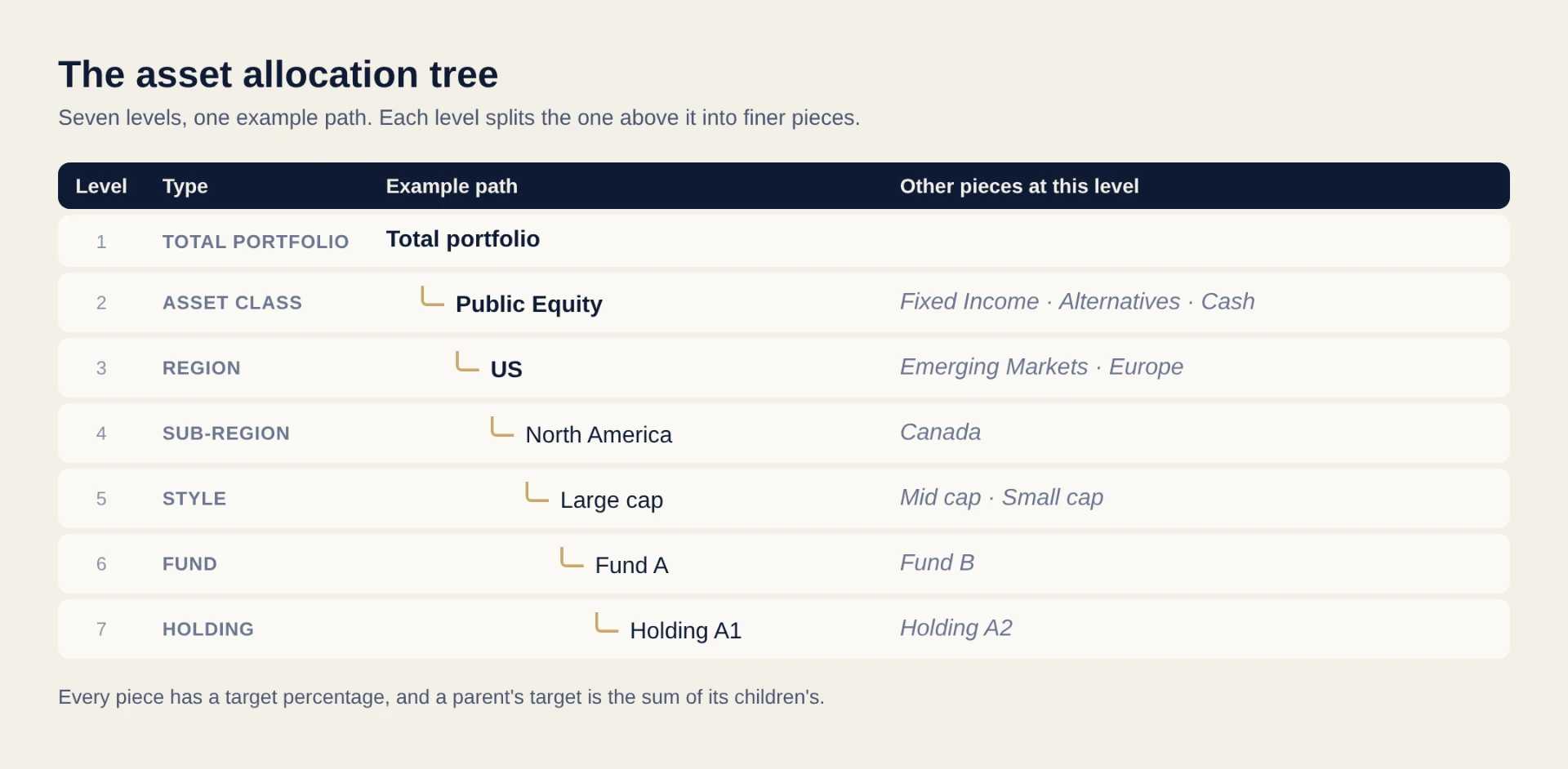
In private wealth, that split is a tree, often seven levels deep. Each level breaks the one above into finer pieces, and every piece has a target percentage. A parent's target is the sum of its children's.
The ask
Portfolio managers and advisers set target allocations on this tree by hand. They wanted it to calculate itself: change a number and the levels around it fill in.
It started in a meeting with a small group of users and the engineering team. The users asked to edit the tree and have it auto-calculate, without losing the numbers they had already chosen.
Our founder, then a junior engineer, was trusted with the feature from start to finish: taking in the requirements, designing it, building it hands-on, demoing it to the engineering managers and then to the users, and releasing it.
What went wrong: the wrong number moved
Take an example (the numbers are illustrative, not from a real account): a user raises Emerging Markets from 10% to 15%. They expect Public Equity to stay at 40%, with the US making room. Instead, Public Equity grows to 45% and the portfolio no longer adds up to 100%.
Here is the whole tree for that example. Gold values were set by the user, plain italic values were calculated by the tool, light blue values were recalculated after the edit, and red values are errors.
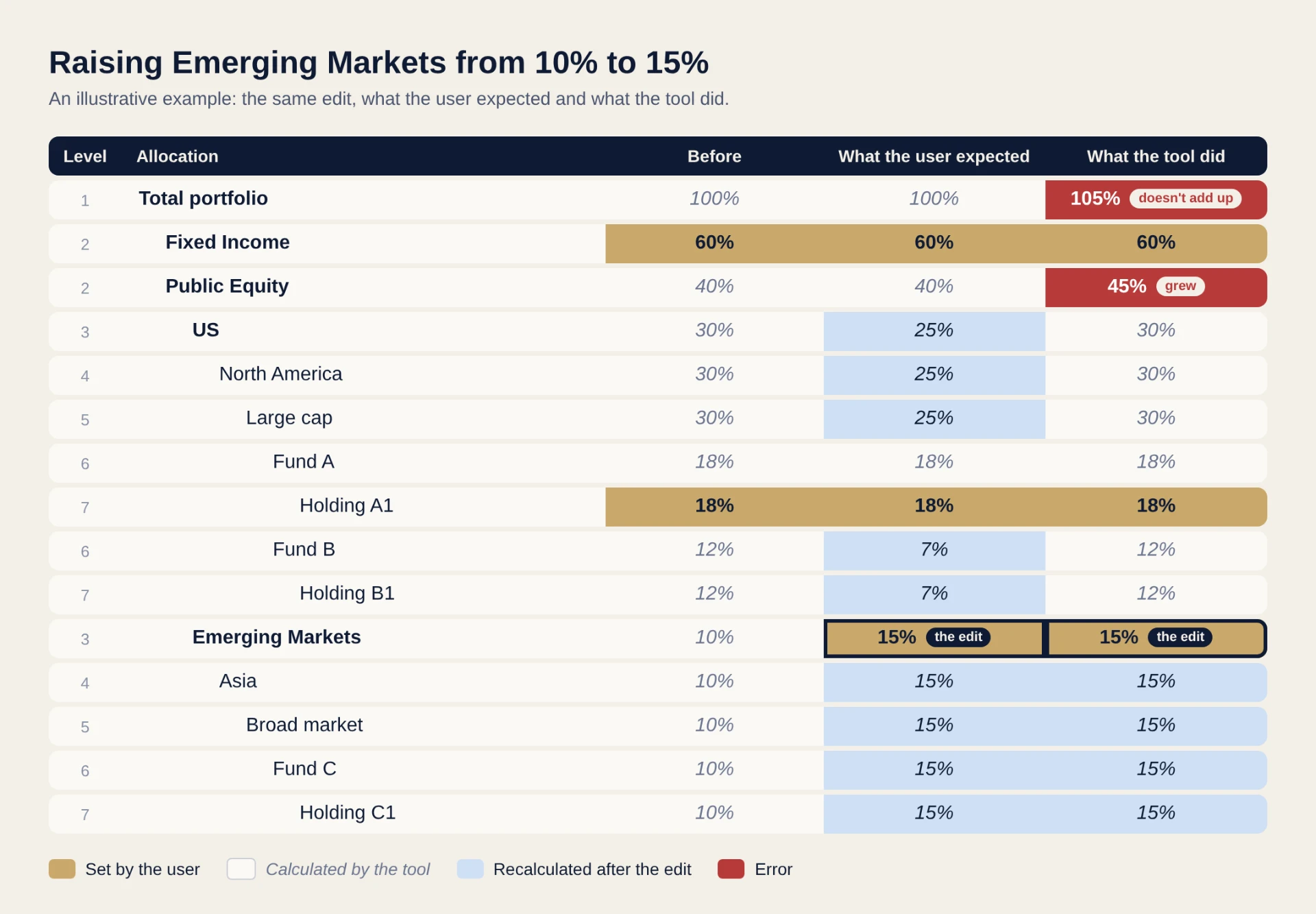
The Emerging Markets branch behaved as expected: the edit filled down to the holdings. The surprise was above it: Public Equity grew to 45%, and the total portfolio went to 105%, when the user only meant to move money within equity. In the expected version, the room comes from Fund B, the only part of the US branch the user hadn't set by hand.
It wasn't a bug in the usual sense. We had assumed a change to one child should build its parent up, and designed it that way without checking. The users meant the opposite: the parent's total stays fixed, and its other children that aren't locked (set by the user) make room. That one action, raising one child, was ours to clarify, and we filled the gap with an assumption instead of asking.
On a seven-level tree, one change ripples up through every level above it. The feature was new and off the critical path, and there was a workaround if you made your changes in the right order. Users were a little frustrated, but extremely patient.
The turning point, and what we learned
Our founder's manager suggested she walk over and watch a user work with the tool. It turned out to be the most useful step of the project.
Watching showed what no meeting had: where they clicked, where they hesitated, where they stopped and looked again. Some of their numbers were decisions ("exactly 15% in Emerging Markets"). The rest should simply fill in around them. Seeing the product through their hands tested it in a way no desk check could.
It was fixed, tested and released within the same week. The users' next request was for more features, and as more portfolio managers and advisers were onboarded, the tree kept working the way they expected.
This is where our founder learned what to ask, and to never assume.
It's how we work with every client today:
- See it before we talk about it. We ask for a demo, a spreadsheet or a real example before the requirements meeting, then ask the user to walk us through it and question every step.
- Ask the moment we're unsure. A five-minute message beats a week built on a guess.
- Demo, release, then ask for every bit of feedback. Users test it in their own work, and we respond straight away.
Words in a meeting carry assumptions on both sides. Five minutes of watching saves the rework.
Sources: CFA Institute, Overview of Asset Allocation · Goldman Sachs Ayco, Client Investment Fundamentals, Session 4